Redesigning the UI to improve usability and workflow
Optimizing AI-Powered Semiconductor
Process Analysis
DK Techin Leave management system redesign
DK Techin had relied on an external leave management tool, but it lacked usability and could not support real workflows.
We designed and developed a new in-house system for about 100 employees, tailored to organisational needs.
I led the UI/UX redesign to simplify the end-to-end flow from request to approval to history process while improving usability and maintainability.
The system was later adopted by a Kakao subsidiary, validating its effectiveness and scalability.
DK Techin had relied on an external leave management tool, but it lacked usability and could not support real workflows.
We designed and developed a new in-house system for about 100 employees, tailored to organisational needs.
I led the UI/UX redesign to simplify the end-to-end flow from request to approval to history process while improving usability and maintainability. The system was later adopted by a Kakao subsidiary, validating its effectiveness and scalability.
Role
UI/UX Designer
Tools
Sketch
Team
1 Designer, 1 PMs, 2 Developers
1 Designer, 2 PMs,
2 Developers
1 Designer, 2 PMs,
2 Developers
Duration
April 2018 – June 2018
Problem & Approach
The original system had a disconnected flow for requests, approvals, and history, with a non-intuitive UI that frustrated employees.
The operations team faced repetitive approvals and inquiries that could not be solved with simple screen fixes.
Using a Lean UX approach, I applied short validation cycles and redesigned the flow from a user-centered perspective.
Key functions were streamlined for faster use, and complex logic was simplified through condition-based UI.
The original system had a disconnected flow for requests, approvals, and history, with a non-intuitive UI that frustrated employees. The operations team faced repetitive approvals and inquiries that simple screen fixes could not resolve.Using a Lean UX approach, I applied short validation cycles and redesigned the flow from a user-centered perspective. Key functions were streamlined for faster use, and complex logics were simplified with condition-based UI.
User flow:
Challenge & Approach
Disconnected flow
Request, approval, and history were fragmented
Disconnected flow
Request, approval, and history were fragmente
Disconnected flow
Request, approval, and history were fragmente
Consistent flow
Redesigned the process into one connected journey
Consistent flow
Redesigned the process into one connected journey
Consistent flow
Redesigned the process into one connected journey
Information access:
Challenge & Approach
Operational Efficiency:
Challenge & Approach
Poor information access
Hard to check key info like remaining leave or team schedules
Poor information access
Hard to check key info like remaining leave or team schedules
Operational overload
Excessive approvals and inquiries overloaded the support team
My Page hub
Centralised requests, approvals, and history in My Page
My Page hub
Centralised requests, approvals, and history in My Page
Operator-focused UX
Reduced repetitive tasks with status visualisation and auto-filtering
Operational efficiency:
Challenge & Approach
Information Access:
Challenge & Approach
Operational overload
Excessive approvals and inquiries overloaded the support team
Operational overload
Excessive approvals and inquiries overloaded the support team
Poor information access
Hard to check key info like remaining leave or team schedules
Operator-focused UX
Reduced repetitive tasks with status visualisation and auto-filtering
Operator-focused UX
Reduced repetitive tasks with status visualisation and auto-filtering
My Page hub
Centralised requests, approvals, and history in My Page
Time Constraints:
Challenge & Approach
Tight timeline
Required rapid validation and improvement within a limited schedule
Tight timeline
Required rapid validation and improvement within a limited schedule
Tight timeline
Required rapid validation and improvement within a limited schedule
Lean UX & UCD
Short validation cycles with user-centred design
Lean UX & UCD
Short validation cycles with user-centred design
Lean UX & UCD
Short validation cycles with user-centred design
UI Consistency:
Challenge & Approach
UI inconsistency
External tool lacked brand alignment and adaptability
UI inconsistency
External tool lacked brand alignment and adaptability
UI inconsistency
External tool lacked brand alignment and adaptability
Design system
Standardised UI elements for consistency and scalability
Design system
Standardised UI elements for consistency and scalability
Design system
Standardised UI elements for consistency and scalability
Research & Validation
How might we?
How might we connect fragmented processes across request, approval, and history into one seamless flow?
How might we connect fragmented processes across request, approval, and history into one seamless flow?
How might we connect fragmented processes across request, approval, and history into one seamless flow?
How might we help employees and managers easily access key information such as remaining leave and team schedules?
How might we help employees and managers easily access key information such as remaining leave and team schedules?
How might we help employees and managers easily access key information such as remaining leave and team schedules?
How might we reduce repetitive approvals and inquiries for the operations team through smarter UI logic?
How might we reduce repetitive approvals and inquiries for the operations team through smarter UI logic?
How might we help users explore and filter complex data in a unified way?
User Research & Validation
Research
I interviewed 2 employees, 2 managers, and 1 operations staff member to identify pain points in the existing leave system.
I interviewed 2 employees, 2 managers, and 1 operations staff member to identify pain points in the existing leave system.
• Fragmented process: Employees had to move between multiple screens to request, check, or track leave.
• Information gaps: Managers couldn’t easily see team availability or remaining balances.
• Operational overload: HR staff faced frequent manual approvals and inquiries.
• Single- step canvas couldn’t scale for multi-recipe flows or new equipment (EQP) types.
• Frequent context switching between canvas, panels, and modals created significant setup fatigue
• Only 2 of 10 users adopted filters due to a disconnected UI most preferred direct search.
Validation
Stakeholder reviews confirmed the redesign addressed core issues. Post-launch, user satisfaction improved significantly based on internal feedback.
Stakeholder reviews confirmed the redesign addressed core issues. Post-launch, user satisfaction improved significantly based on internal feedback.
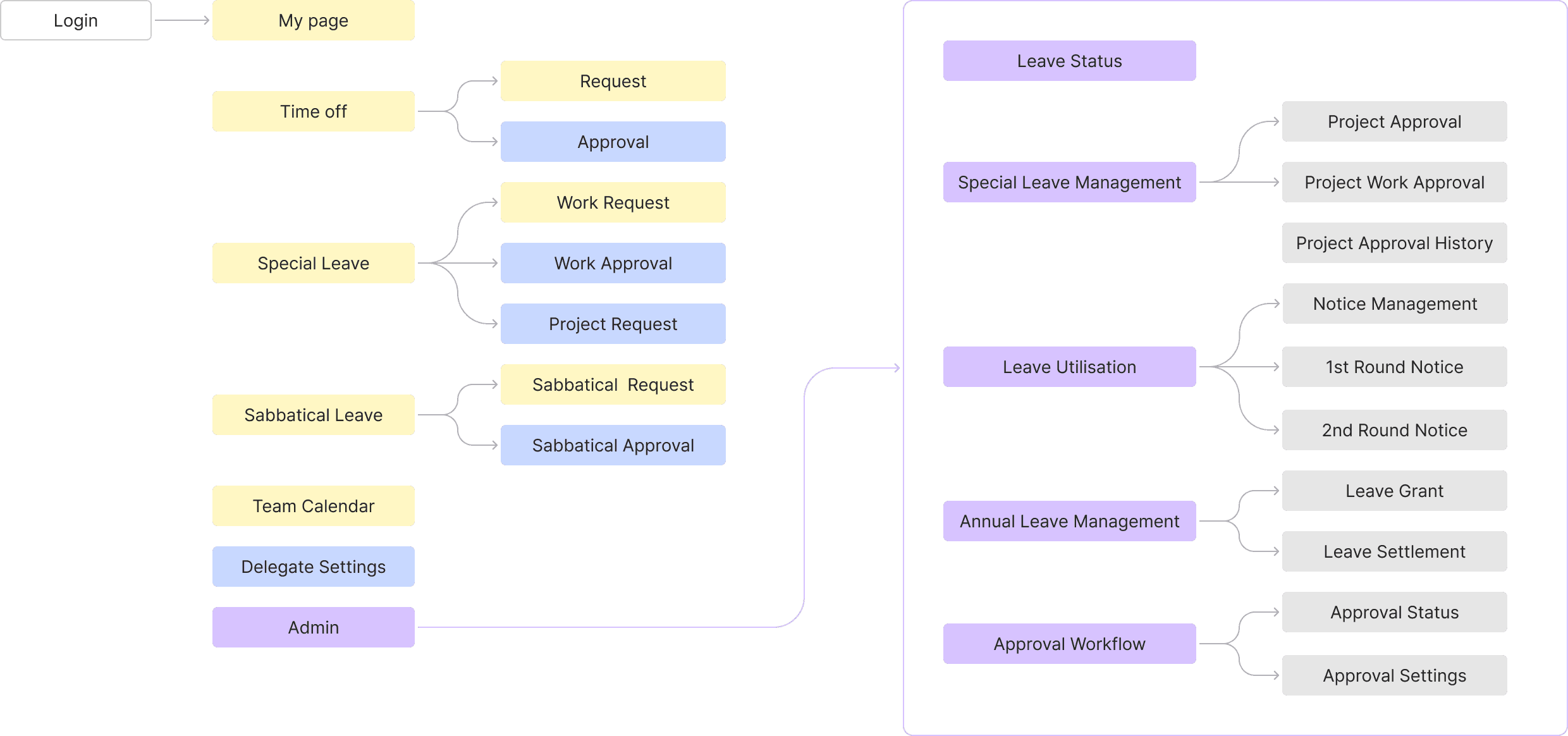
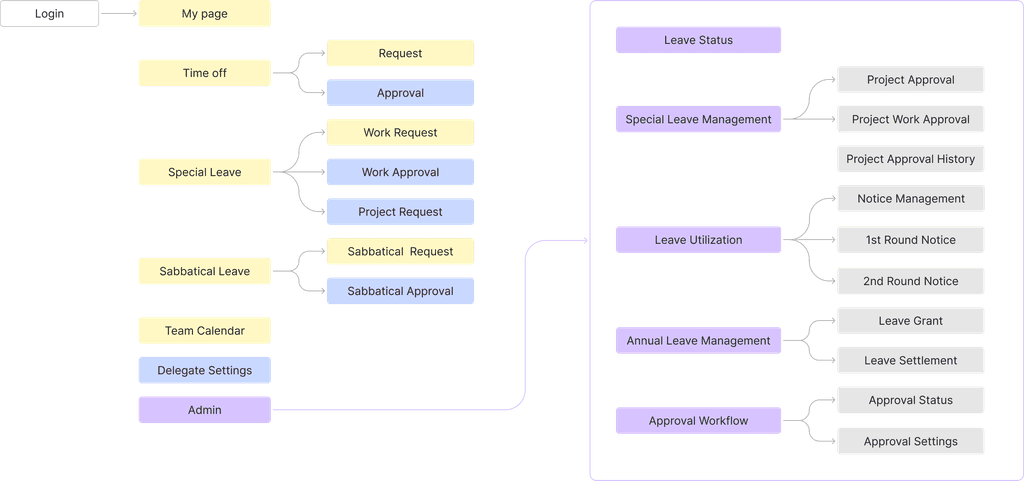
Role-Based content organisation
I simplified the flow by reorganizing the previously cluttered request, approval, and history processes around a centralized 'My Page'.
By clearly defining user roles and permissions, I reduced unnecessary page switching and made the workflow more intuitive—allowing each user type to access the information they need efficiently.
All Employees
Team Manager
Administrator
My Page-centred leave request Flow
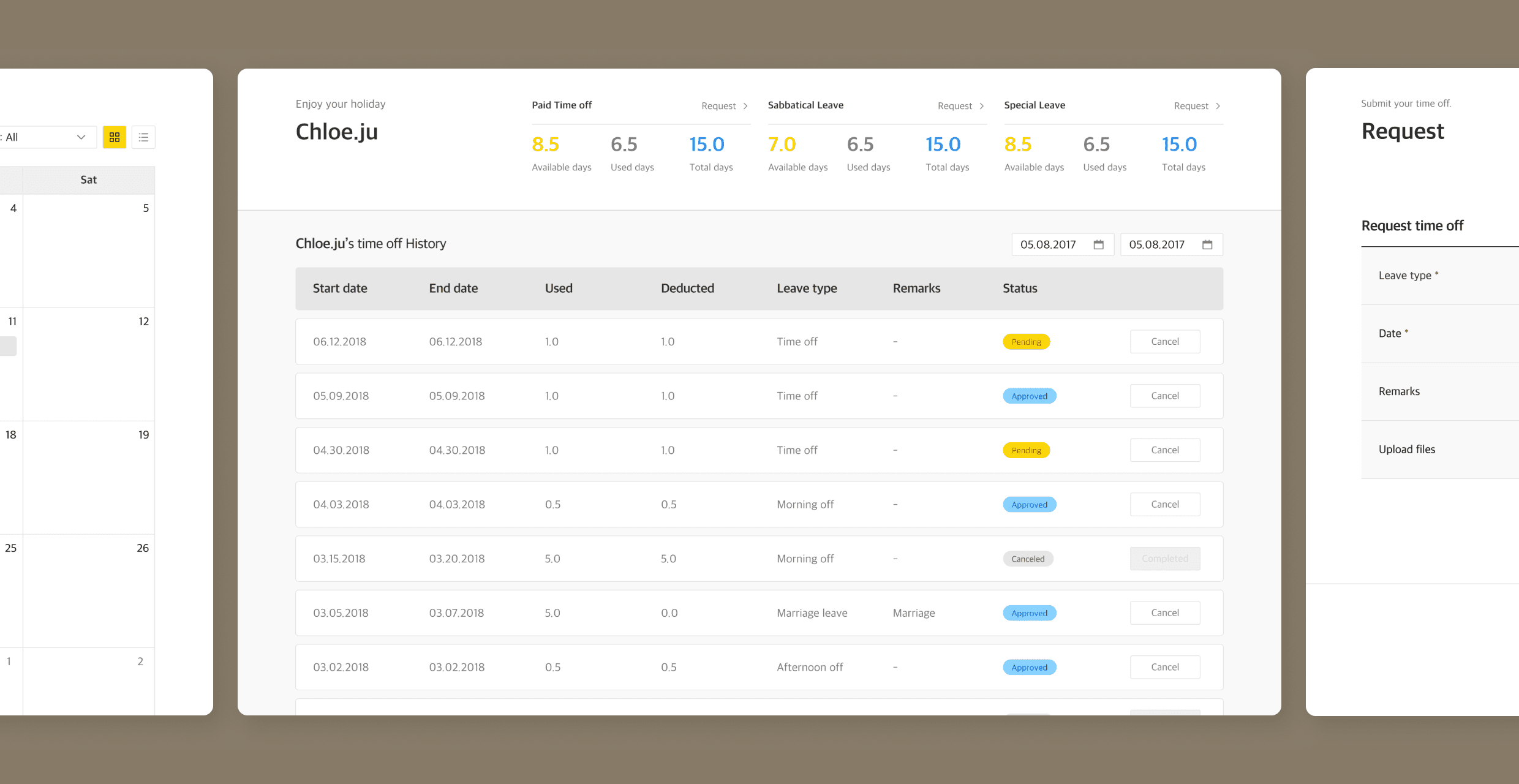
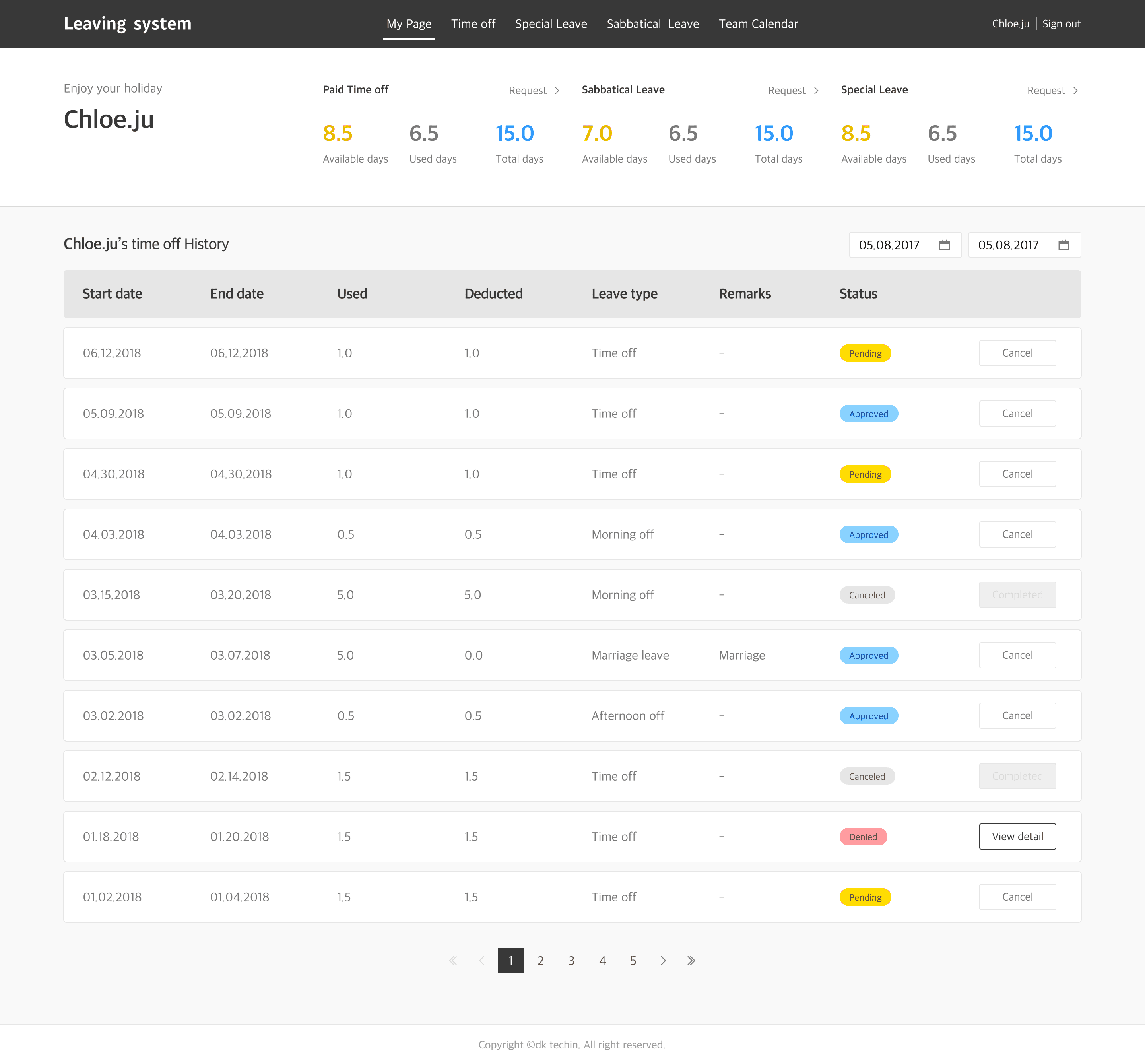
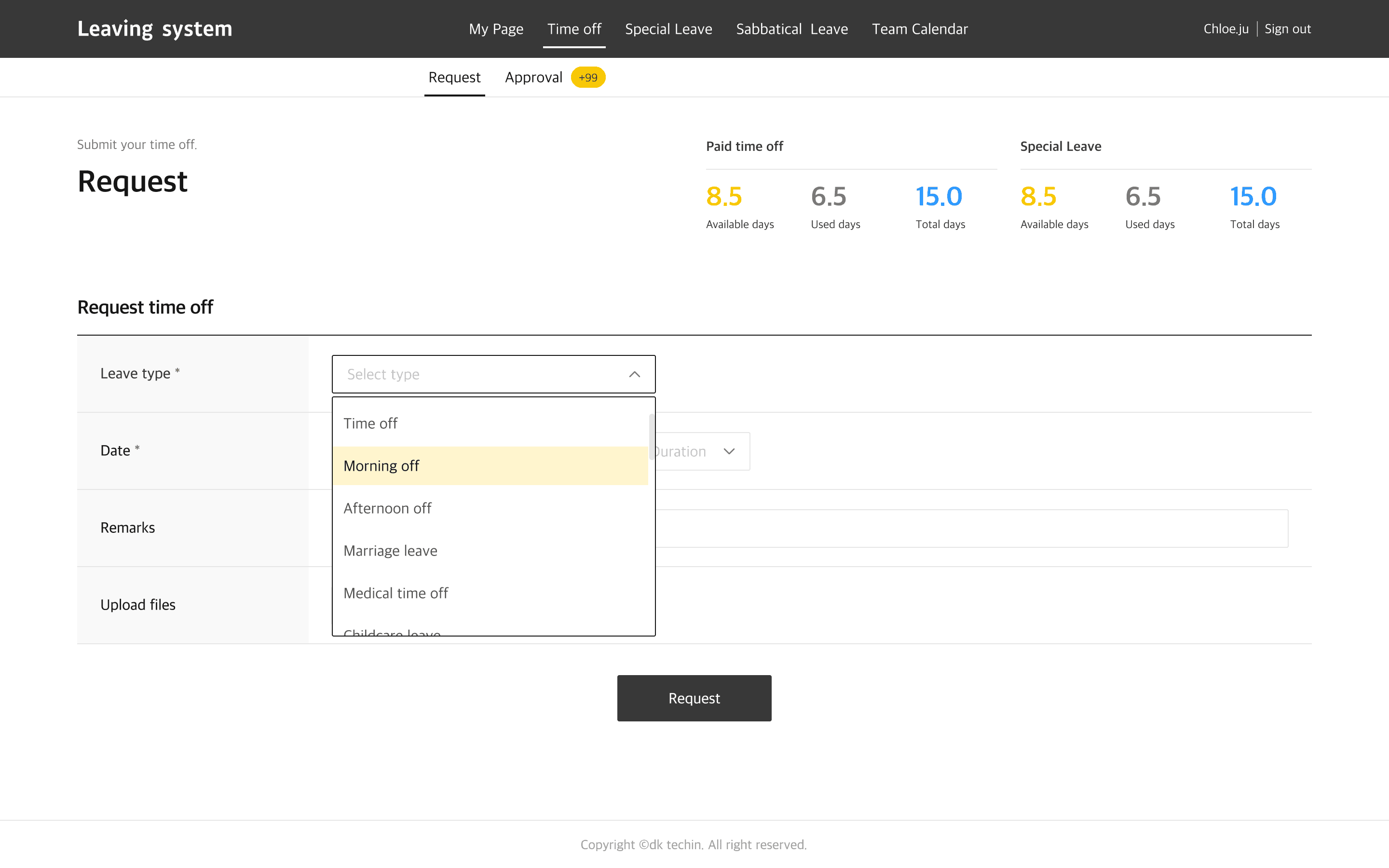
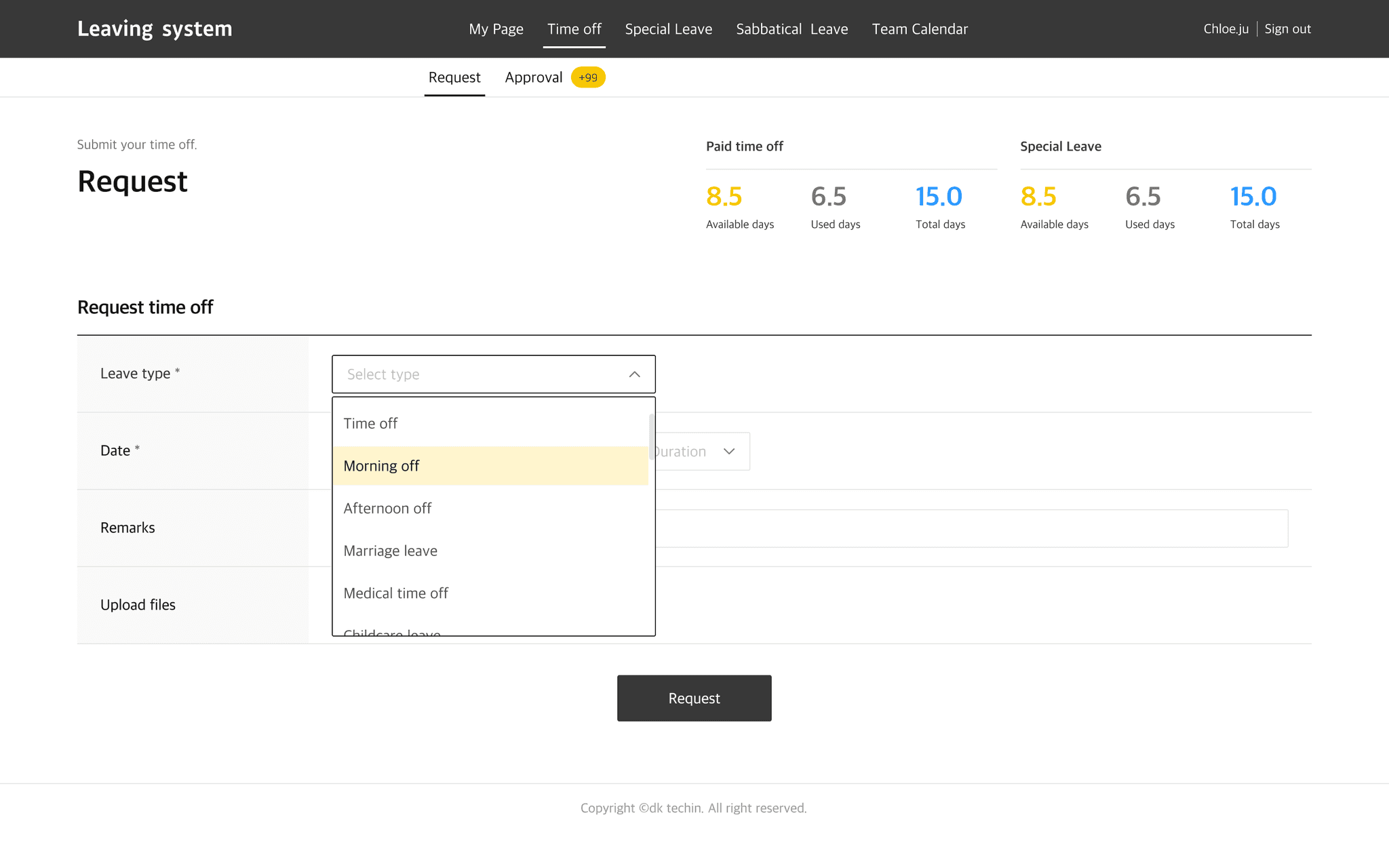
Users previously had to switch between multiple screens to check leave balances, request history, and start a new request.
To address this, I designed a unified “My Page” where users could review all relevant information and directly move to the request page.
Automatic date calculation by leave type was introduced to reduce input effort and errors.
The flow was designed to connect information checking and request submission in a simple and intuitive way.
Manager approval workflow
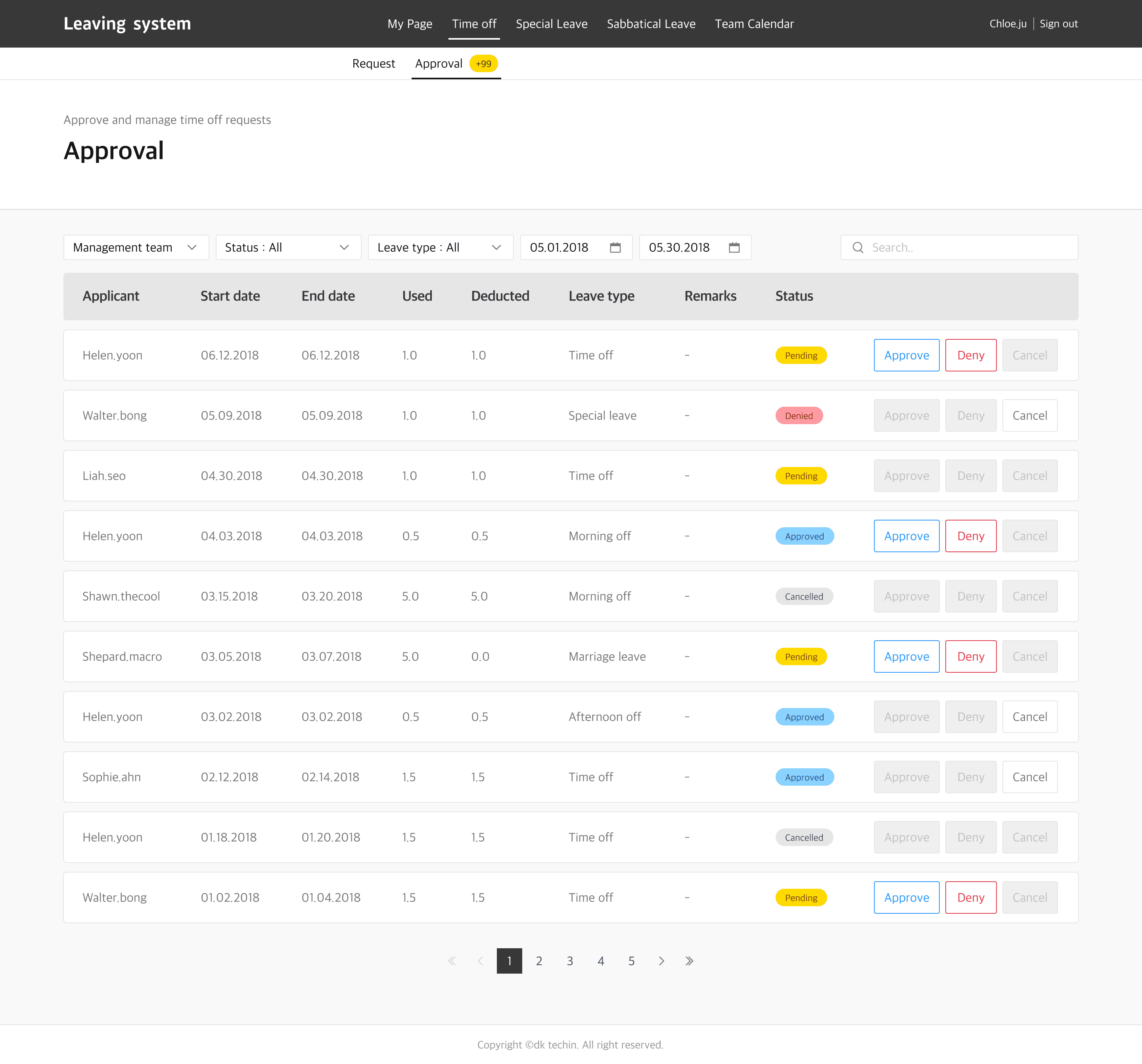
The original approval process was repetitive and fragmented, making it tiring and error-prone for managers.
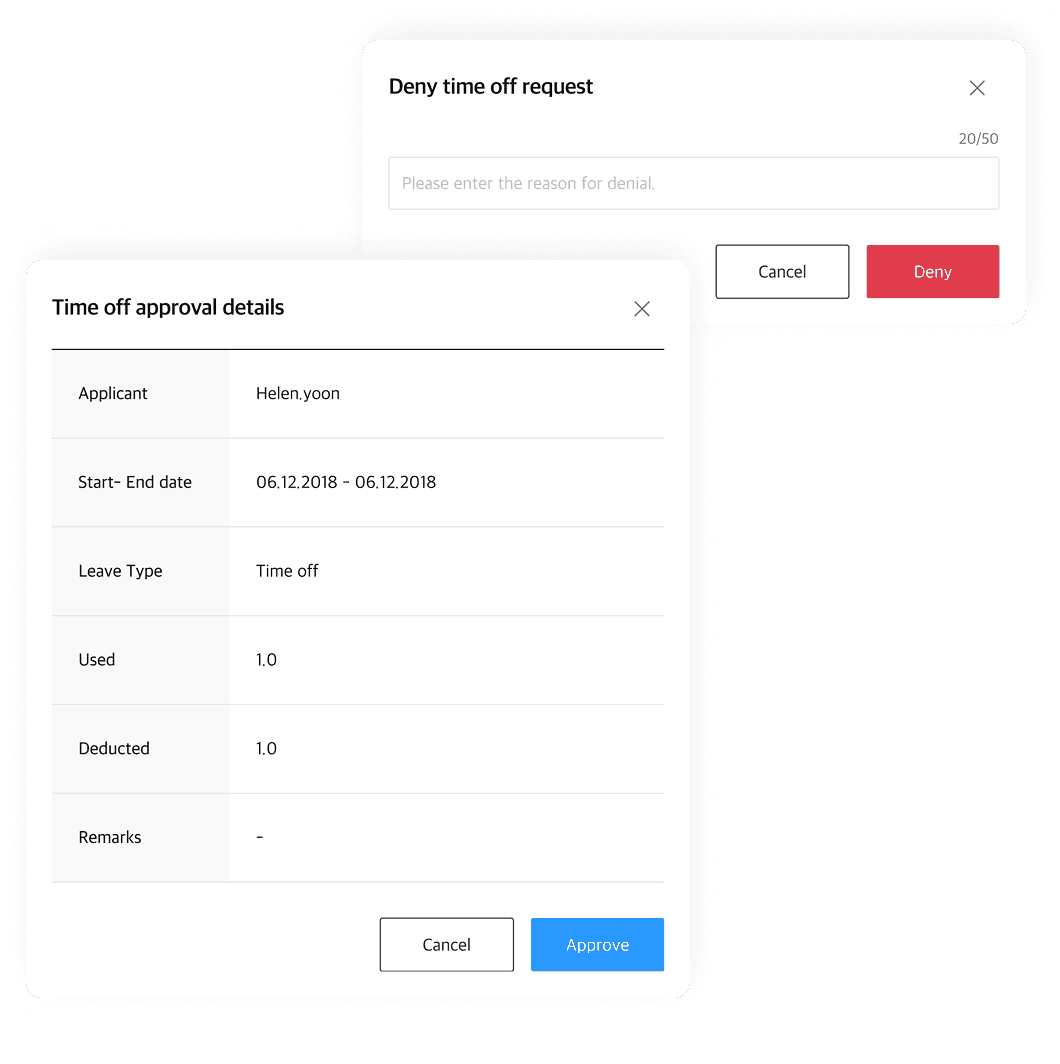
To address this, I designed status-based colour coding, filters, and a simplified modal displaying key details available days, leave period, and type so that requests could be reviewed at a glance.
The workflow was restructured to make approvals faster, less tiring, and more accurate.
The original approval process was repetitive and fragmented, making it tiring and error-prone for managers.
To address this, I designed status-based colour coding, filters, and a simplified modal displaying key details available days, leave period, and type so that requests could be reviewed at a glance.
The workflow was restructured to make approvals faster, less tiring, and more accurate.
Designing admin workflows for efficient Leave management
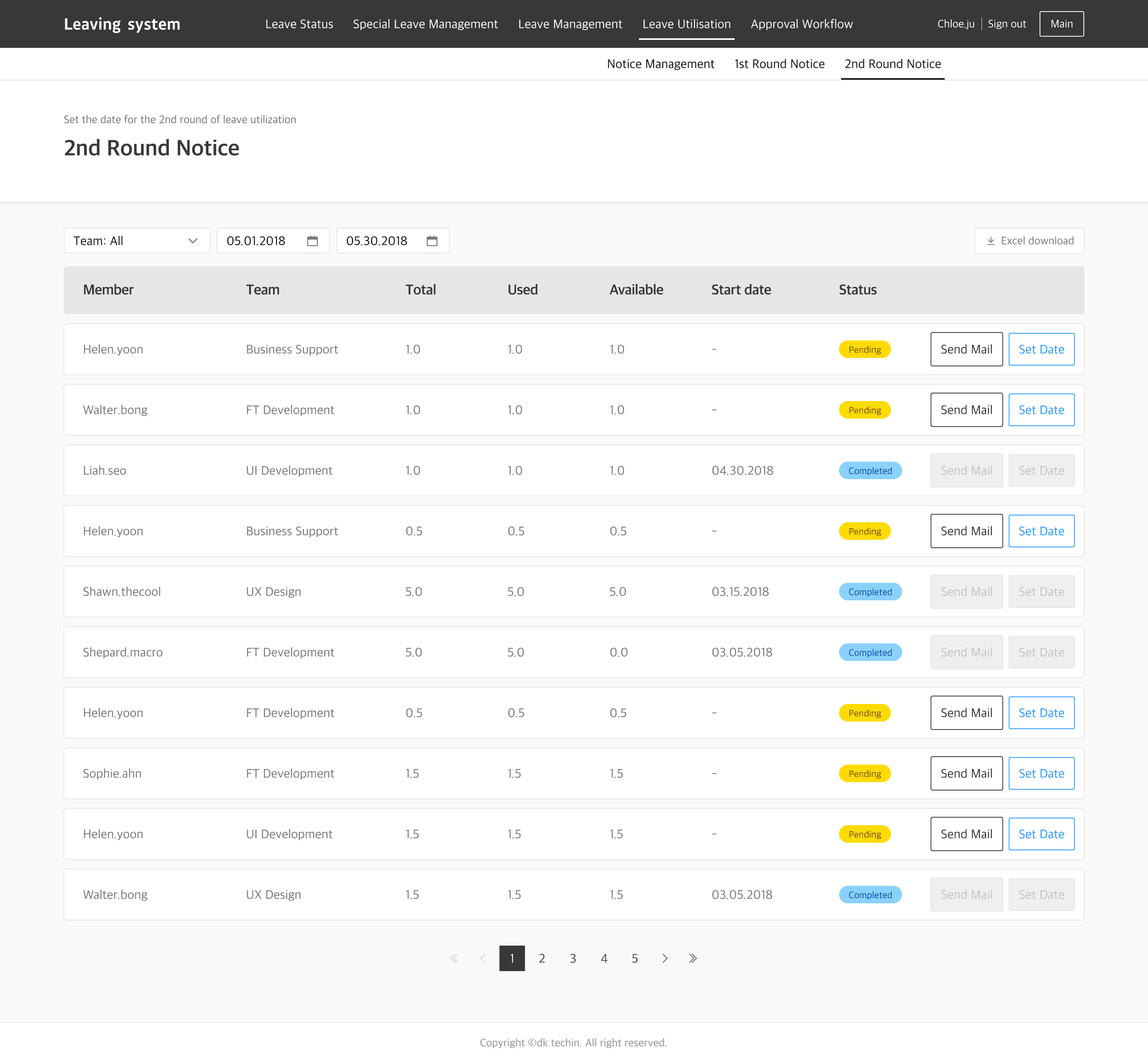
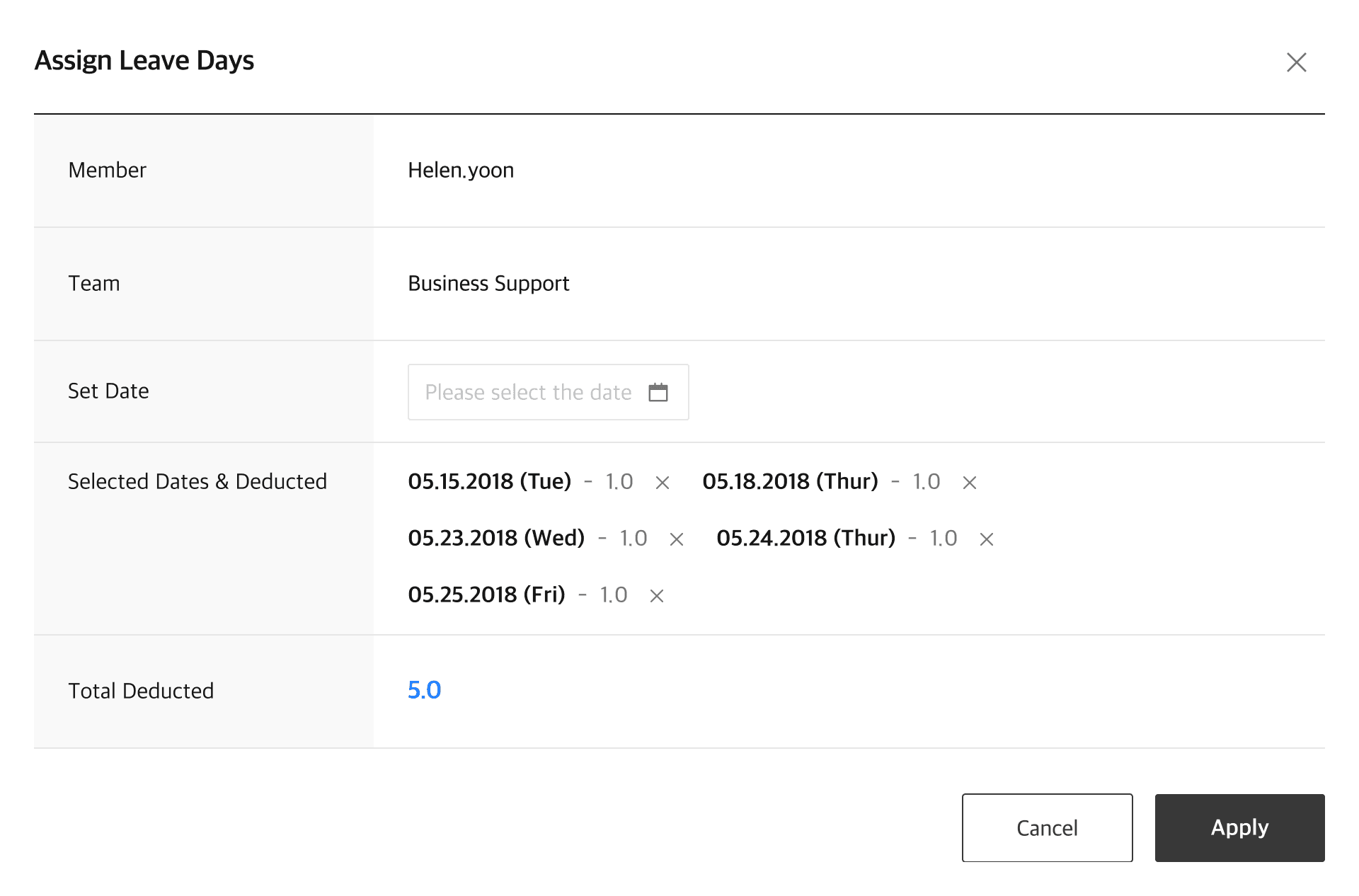
Leave utilisation
Previously, administrators had to manually identify employees, send notifications, and manage records for annual leave utilisation a process that was time-consuming and error-prone.
To solve this, I designed a new feature to automate the process with automatic identification, team-based filtering, and staged notifications.
All results were stored in the system with exportable Excel logs, ensuring transparency while reducing repetitive effort.
The Consumer App was designed to connect the flow from delivery tracking to return requests intuitively, encouraging eco-friendly actions and repeat engagement.
Real-time route, temperature, and status data were visualised on a map to build trust in the cold chain process.
Reward experiences were considered to naturally motivate ongoing participation in the system.
Custom isometric illustrations were applied across key screens to strengthen the brand experience.
※ In Korea, labour law encourages employers to promote the use of annual leave to protect employees’ right to rest and to reduce disputes over unused leave.
※ In Korea, labour law encourages employers to promote the use of annual leave to protect employees’ right to rest and to reduce disputes over unused leave.
Customisable approval workflow
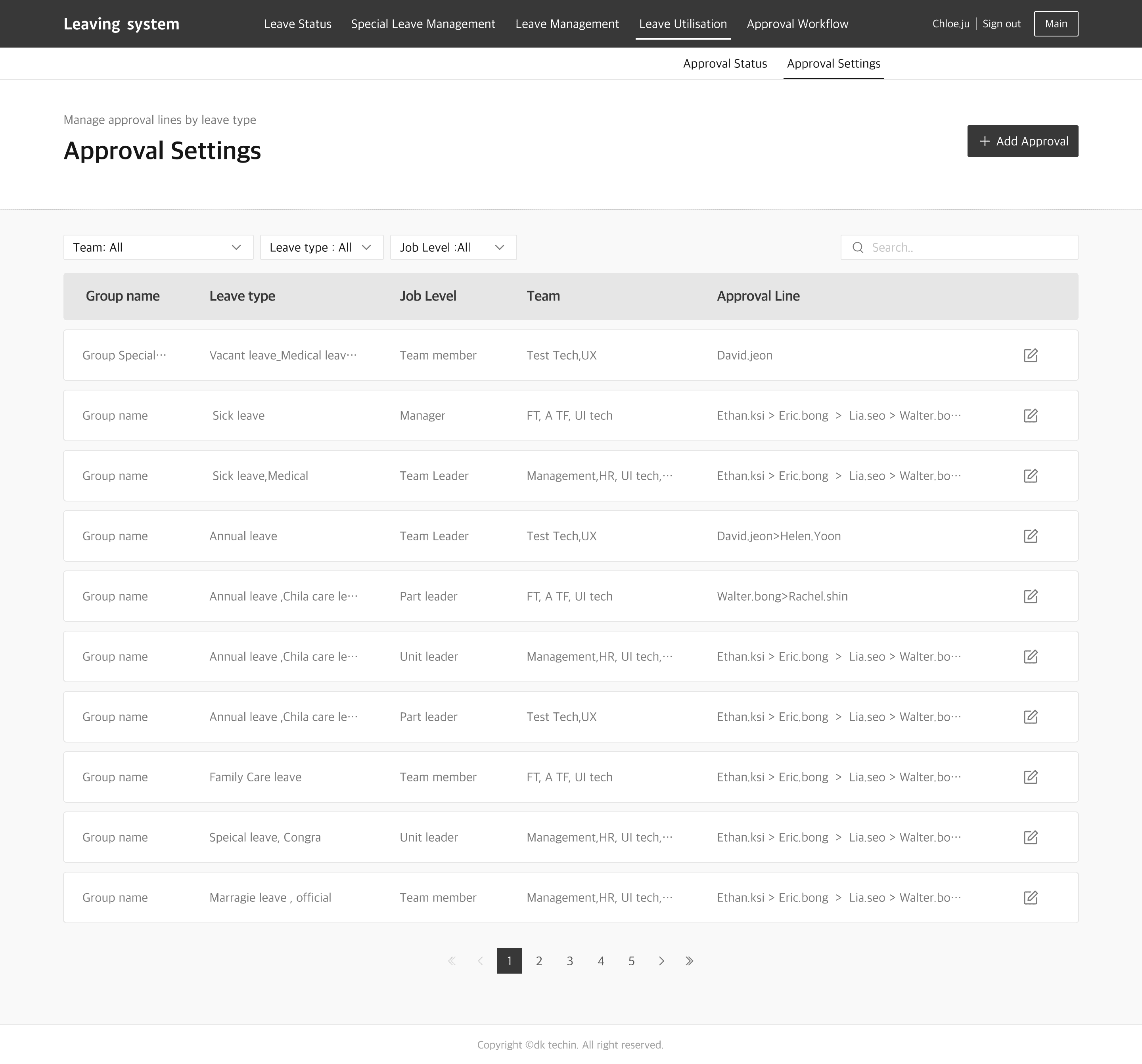
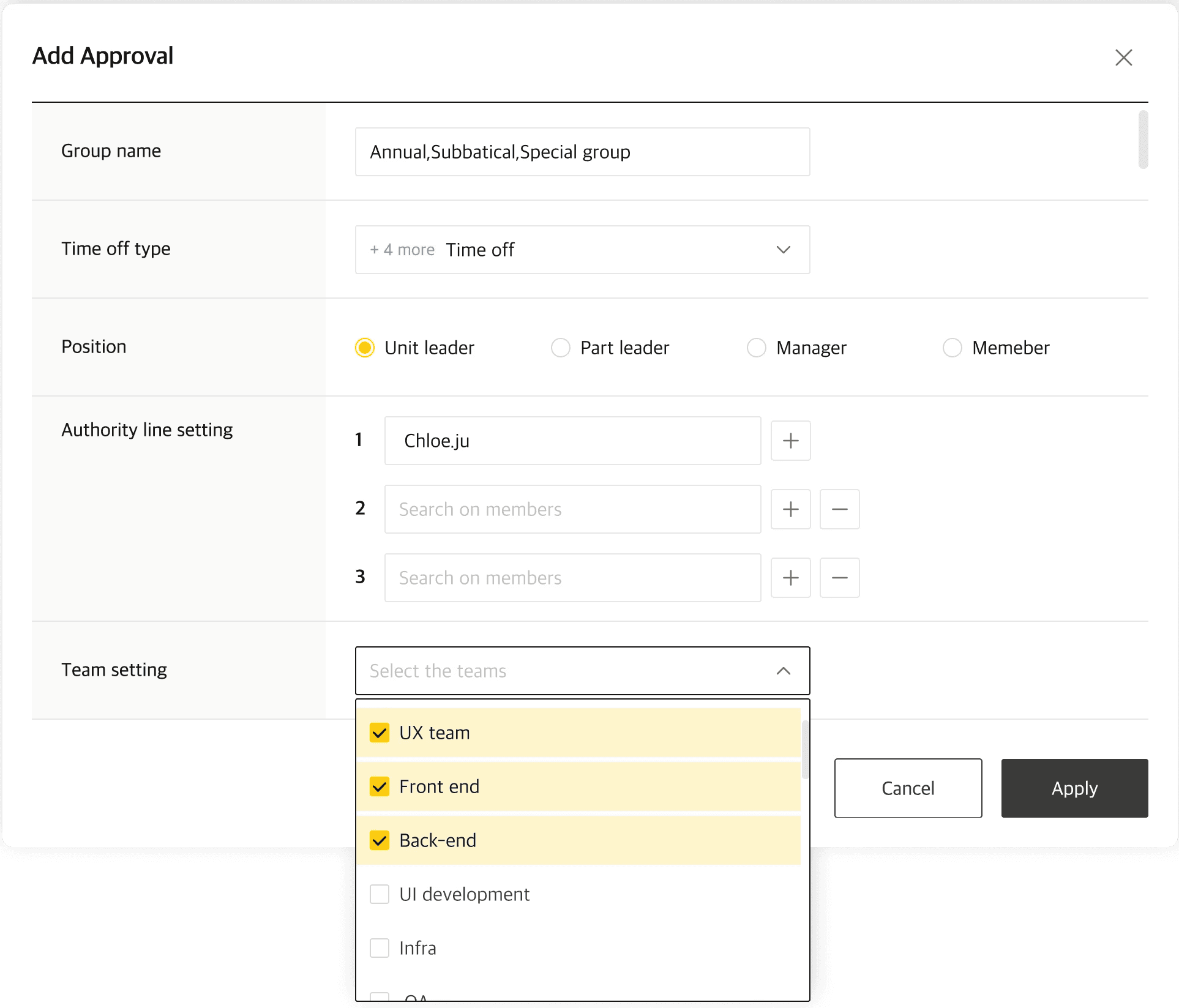
The old approval flow was rigid and couldn’t reflect different rules across organisations or leave types, causing confusion and additional setup work.
To address this, I designed an approval-line screen where admins could flexibly set steps based on policy.
Approvers were auto-filtered from the organisation chart, roles could be assigned via a modal, and flows could be saved as templates for reuse reducing repetition and giving admins greater control.
The Consumer App was designed to connect the flow from delivery tracking to return requests intuitively, encouraging eco-friendly actions and repeat engagement.
Real-time route, temperature, and status data were visualised on a map to build trust in the cold chain process.
Reward experiences were considered to naturally motivate ongoing participation in the system.
Custom isometric illustrations were applied across key screens to strengthen the brand experience.
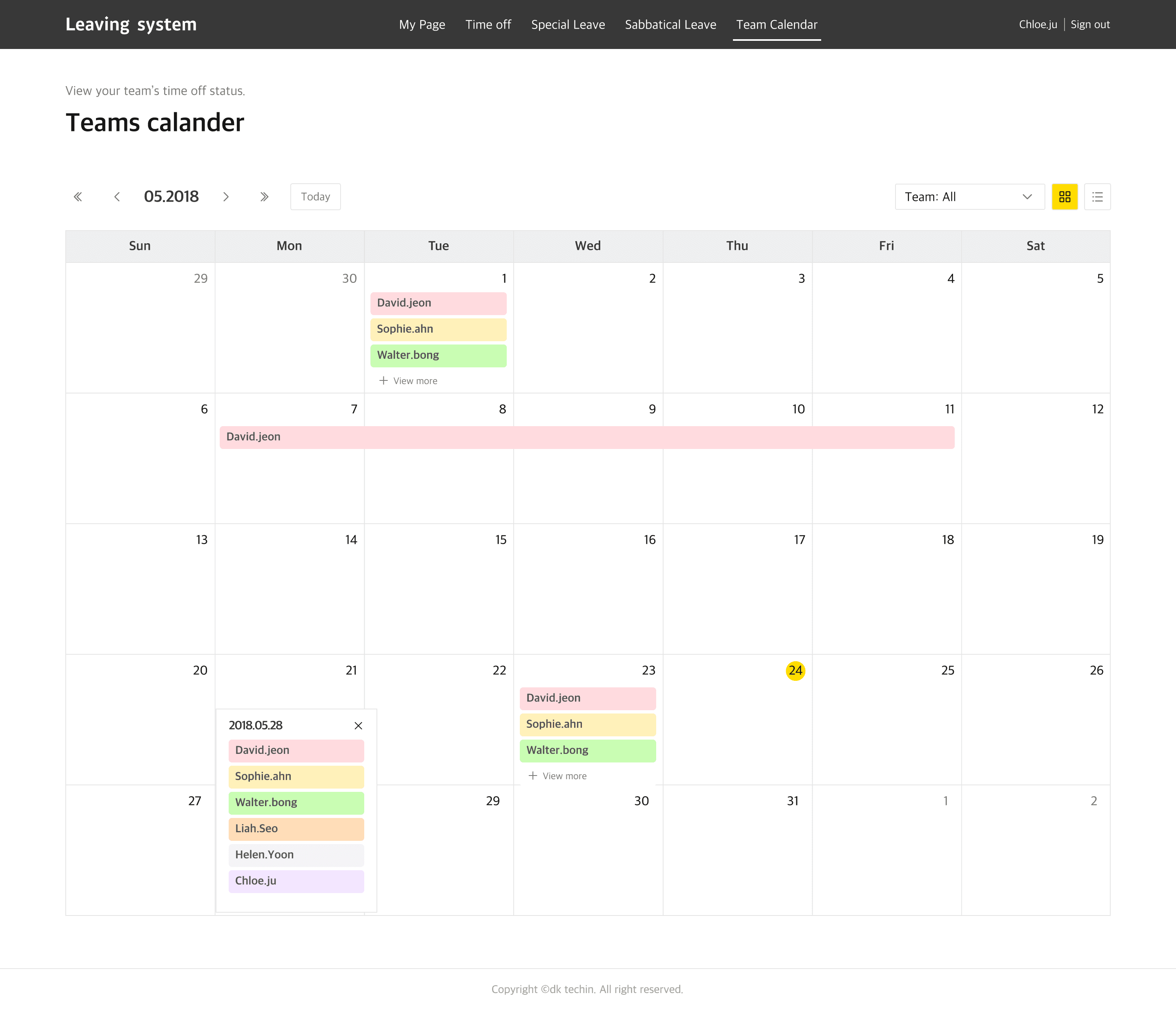
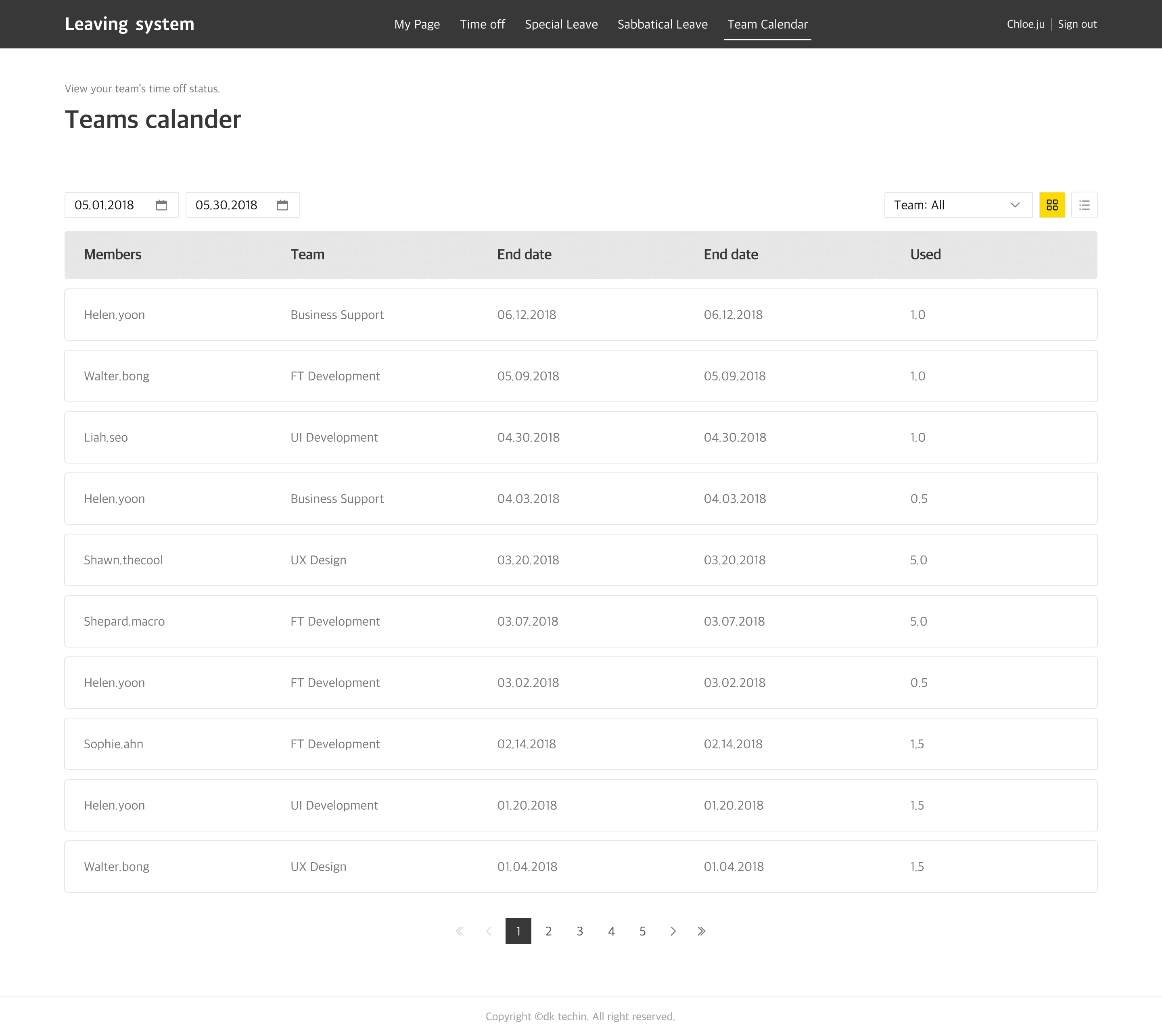
Organisation-wide Leave schedule visualisation
To help managers and team leaders prevent overlapping leave and coordinate scheduling at the organisational level, I designed both calendar and list views with department- and organisation-based filters.
This view was created to display daily leave counts and statuses on a single screen, reducing manual coordination and enabling more efficient collaboration.
To help managers and team leaders prevent overlapping leave and coordinate scheduling at the organisational level, I designed both calendar and list views with department- and organisation-based filters.
This view was created to display daily leave counts and statuses on a single screen, reducing manual coordination and enabling more efficient collaboration.
Establishing a design system for UI consistency and scalability
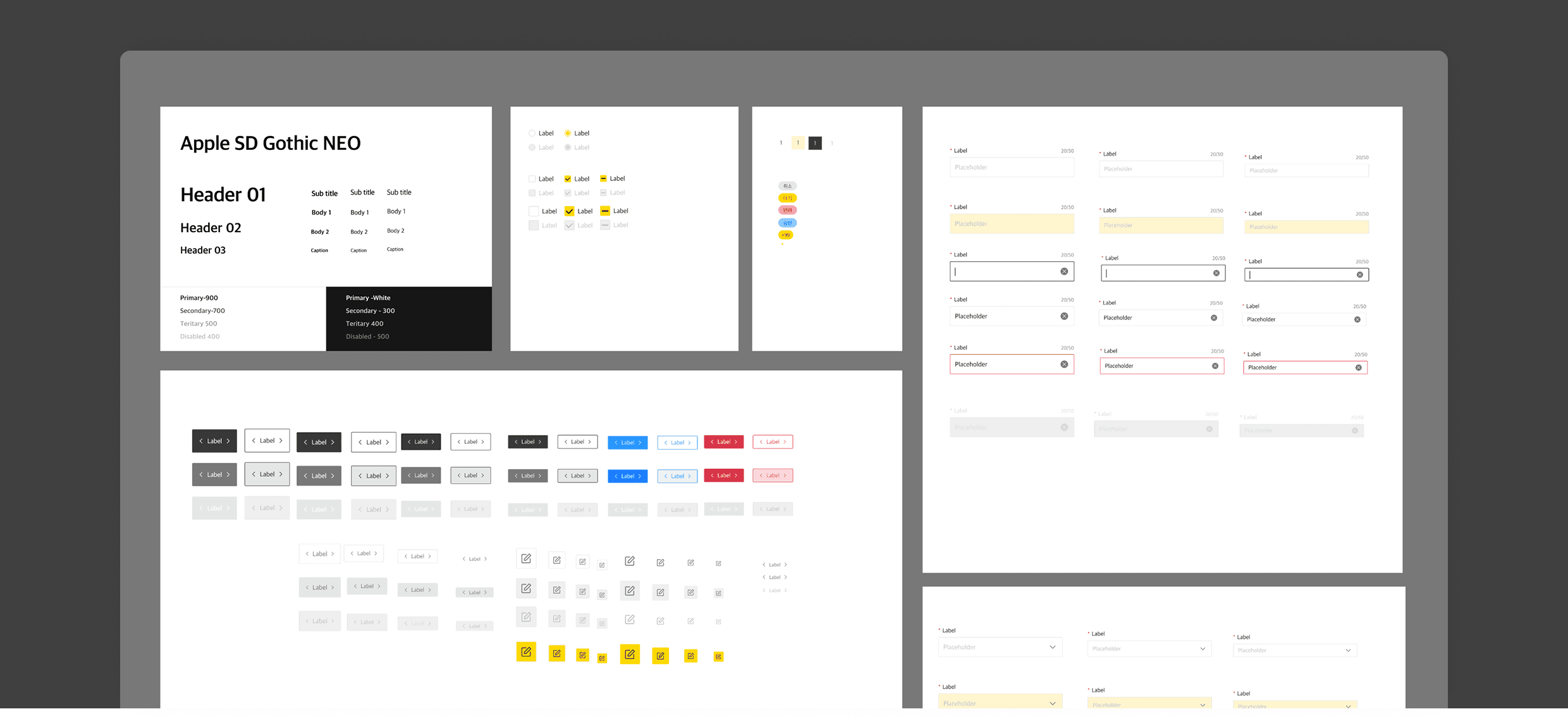
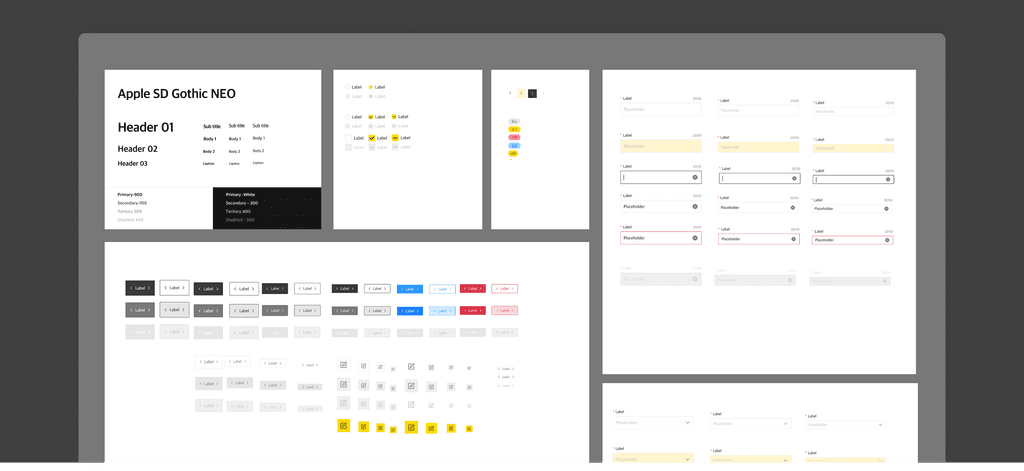
To ensure consistency, I aligned frequently used UI elements such as buttons, input fields, and calendars, with Kakao’s brand guidelines, and built reusable components into a design system.
This system was developed to maintain visual consistency across pages, improve collaboration between designers and developers, and flexibly support future maintenance and feature expansion.
Key results & insights
This project applied a Lean UX and user-centred design (UCD) approach, using short validation cycles aimed at achieving a three-month release.
Working closely with PMs, developers, and operators, I rapidly incorporated user feedback and streamlined the entire flow around “My Page.”
Complex logic was restructured with condition-based UI to make it more intuitive, improving both usability and operational efficiency.
Through this process, I learned the importance of short-cycle collaboration and user-centred design — beyond simply delivering results.
In the PaaS project, I designed the UI/UX and app structures to reflect different user roles and operational scenarios.
Through this process, I recognised the importance of considering user flows across the entire service journey,
and learned that building a design system from the early stage of UI components is critical for long-term maintainability.
Key results
Key results
Key results
01
Integrated requests, approvals, and history into My Page
01
Integrated requests, approvals, and history into My Page
01
Simplified fragmented steps and redesigned the structure for flexible equipment and process expansion
02
Provided leave balances, history, and schedules in one view
02
Provided leave balances, history, and schedules in one view
02
Simplified fragmented steps and redesigned the structure for flexible equipment and process expansion
03
Improved efficiency with status visuals and filters
03
Improved efficiency with status visuals and filters
03
Simplified fragmented steps and redesigned the structure for flexible equipment and process expansion
04
Validated and iterated within three months using Lean UX & UCD
04
Validated and iterated within three months using Lean UX & UCD
04
Simplified fragmented steps and redesigned the structure for flexible equipment and process expansion
05
Built a design system for consistency and scalability
05
Built a design system for consistency and scalability
05
Simplified fragmented steps and redesigned the structure for flexible equipment and process expansion
© 2025 Portfolio
© 2025 Portfolio
© 2025 Portfolio